There is no best newsletter platform. There is a best newsletter platform for the newsletter you are building, and the three leading options are built for three genuinely different jobs.
Get this wrong and you do not just overpay. You end up fighting your tool: sending broadcasts on a platform designed for automation funnels, or building a sales sequence on a platform designed for publishing. Both are miserable in the same way.
The decision
Which one is yours?
- Your newsletter is the product
- beehiiv
- Your list sells a course, coaching or a product
- Kit
- You want capable email marketing for the lowest price
- MailerLite
Each of those answers is argued out below, along with who should pick none of the three.
Comparison
| Tool | Best for | Free plan | Starting price | CreatorStrata verdict | Visit |
|---|---|---|---|---|---|
| beehiiv | Newsletter-first creators who want growth and monetization built in | Yes | $59/month | The publishing platform. Pick it when the newsletter itself is the business. | Visit |
| Kit | Creators who sell products or courses off the back of a list | Yes | $33/month | The creator CRM. Pick it when email exists to sell something else. | Visit |
| MailerLite | Budget-conscious creators who want capable email marketing cheaply | Yes | $12/month | The value pick. Pick it when the budget is the binding constraint. | Visit |
Scroll the table sideways to see every column.
How we evaluated these
We did not score these out of ten. A single number would hide the only thing that matters here — that the same feature is an advantage for one creator and dead weight for another. Instead we compared them on the five questions that actually change the answer:
- What is the newsletter for? A publication, or a channel into a business?
- What does it cost at the size you will actually be, not at the headline entry tier?
- How does the free plan behave — is it a real starting point or a demo?
- Where does growth come from — does the platform help, or is that entirely your job?
- What happens when you outgrow it?
Pricing throughout comes from each vendor’s own pricing page, re-read in October 2026. We have also now signed up to all three and sent a real issue from each — that test, and what it changed, is in what happened when we set all three up below. We have not run any of them as our primary platform for months on end, so nothing here is a long-term verdict; it is documented behaviour, plus one careful first-run.
beehiiv — for newsletter-first creators
beehiiv treats the newsletter as the product. The subscribe page, the archive website, the recommendation network that puts you in front of other newsletters’ readers, the ad marketplace, paid subscriptions — those are platform features, not integrations you assemble.
The free plan running to 2,500 subscribers is the most consequential detail for a new newsletter. It is enough room to find out whether the thing works before you have paid anything for it.
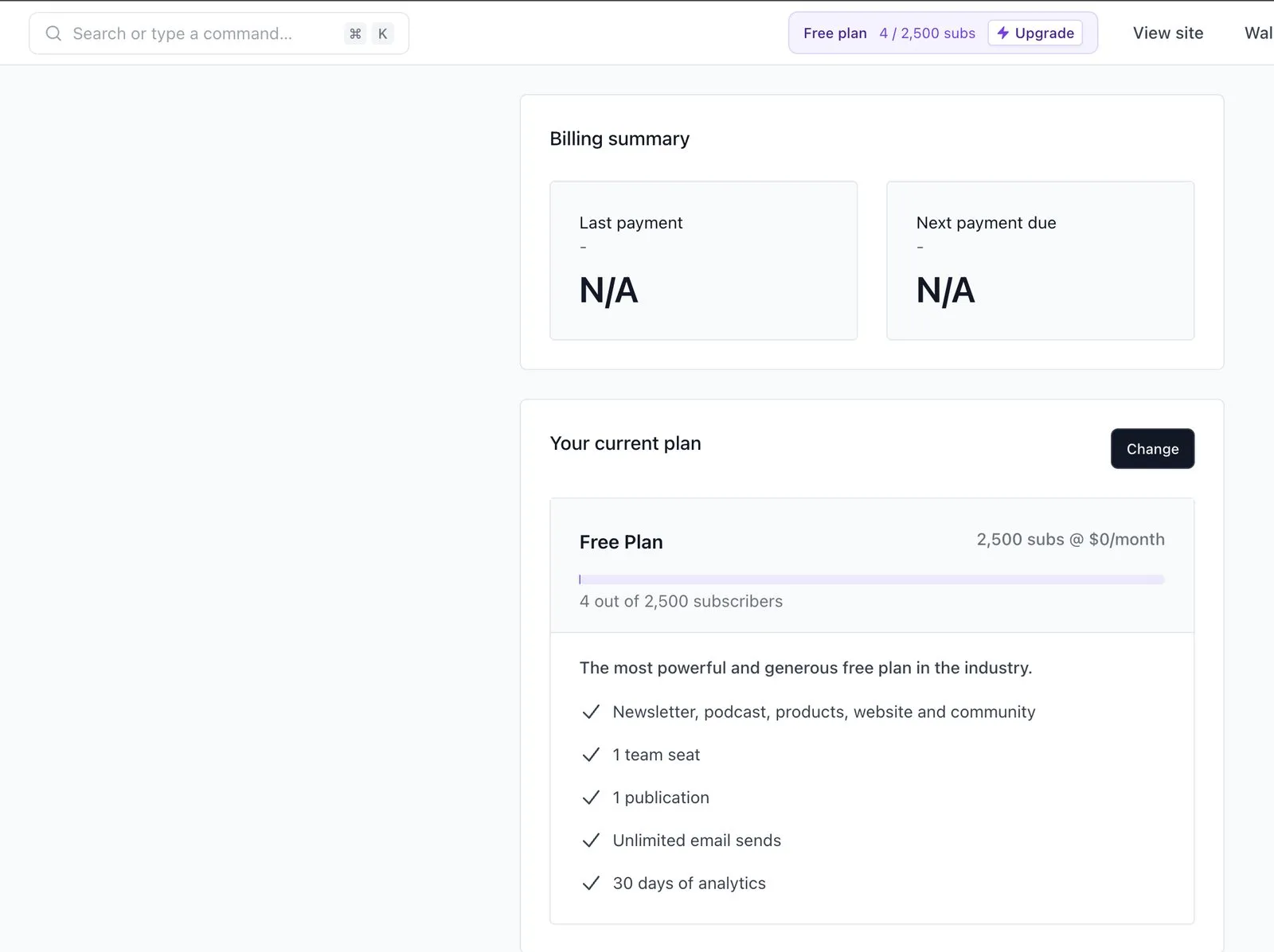
Be clear about what that free plan does not carry, though: no custom domain, no automations, and no way to take money. Your newsletter lives on a beehiiv subdomain until you reach Lite at $59/month. beehiiv renamed and re-cut its plans in October 2026 — the Launch, Scale and Max tiers that older articles describe are now Free, Lite and Pro, with the entry paid price up from $49 to $59 billed monthly.
The cost of that focus shows up when your newsletter is not the business. If email is how you nurture buyers for a course, beehiiv’s automation is thinner than what Kit gives you, and the growth features you are paying for are aimed at a goal you do not have.
Kit — for creators selling something
Kit is closer to a CRM for creators than a newsletter tool. Subscribers carry tags, and tags drive what happens next: bought the course, clicked the waitlist, opened three emails and never converted. The visual automation builder makes branching logic legible in a way broadcast-first tools do not attempt.
Its free plan is the largest of the three at up to 10,000 subscribers — with one important catch. Automations are not on it, and neither are sequences; opening Email sequences on the free plan returns an upgrade notice, which is what happened when we tried it in October 2026. (Kit’s own help centre describes a free plan that includes one sequence and one basic automation. The product did not agree with it on the day we looked.) Since automation is the main reason to choose Kit, the free plan is best understood as a generous place to hold a list you are not yet working, not as a free version of the product you are actually buying.
Paid pricing starts at $33/month at 1,000 subscribers, which is more than MailerLite charges at a comparable size. You are paying for the automation model, so the question is simply whether you will use it.
MailerLite — for the cost-conscious
MailerLite is the value option and does not pretend otherwise. Paid plans open at $12/month, and automations, websites and landing pages are in the box rather than gated behind a growth tier. For a creator whose real constraint is monthly cost, that combination is hard to argue with.
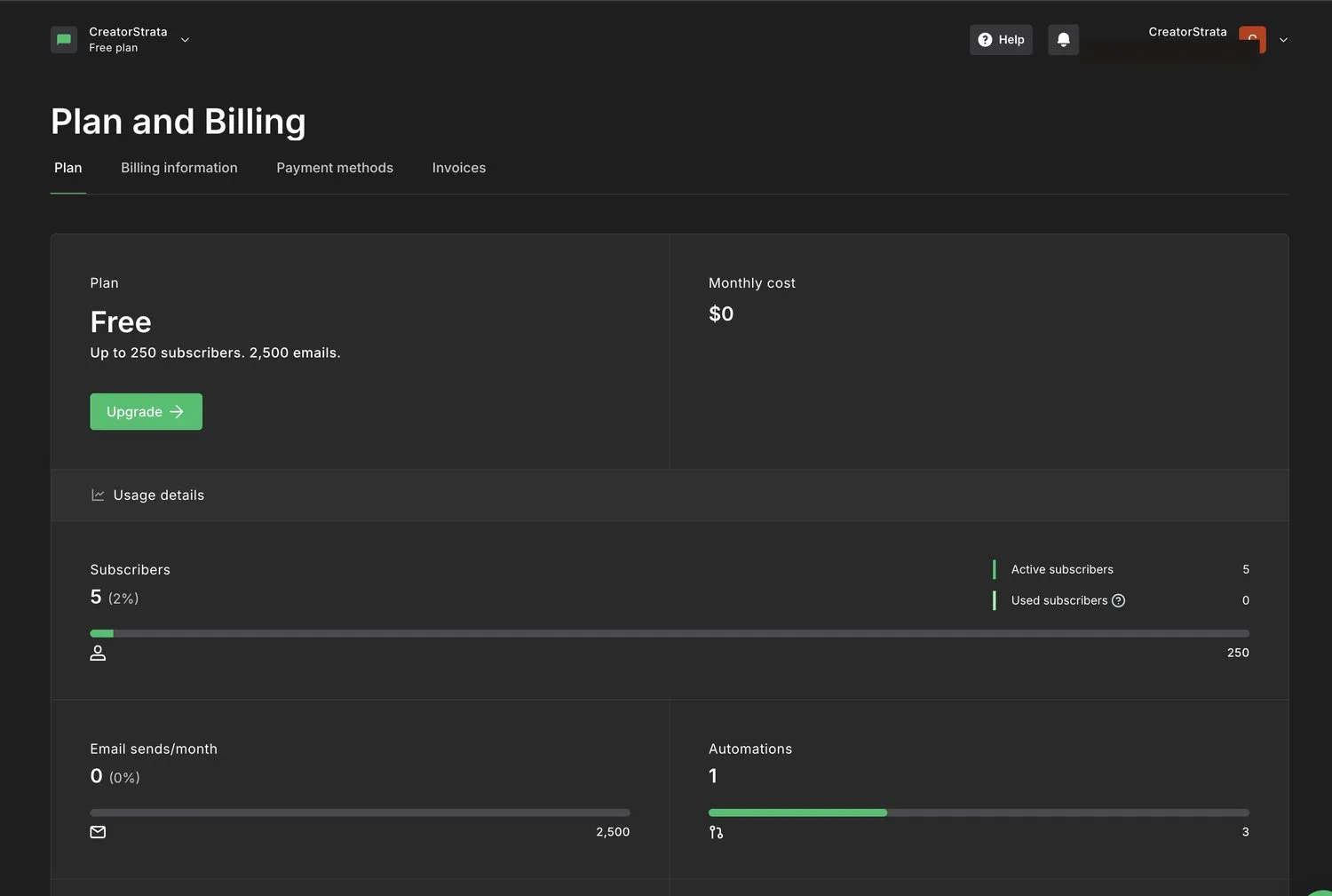
The limits are honest ones. The free plan stops at 250 subscribers and 2,500 monthly emails — a trial, not a runway. There is no ad network and no recommendation engine, so subscriber growth is entirely your problem. And new accounts are reviewed before you can send — ours was asked for a website or social account and approved on the spot, but it is a gate that exists. Two other things to know going in: signup asks for a postal address, which then prints in the footer of every email you send, and every new account starts on a 14-day trial of the premium features, so the first fortnight is not the free plan you will end up on.
What happened when we set all three up
In September and October 2026 we signed up to all three on their free plans and did the same job in each: add a subscriber, build one issue with a heading, two short paragraphs, an image and a link, and send it for real. One person, once per platform, in the order MailerLite, beehiiv, Kit.
| MailerLite | beehiiv | Kit | |
|---|---|---|---|
| Signup to first send, handling time | 22 min | 12 min | 13 min |
| Screens needing an entry or a choice | 14 | 20 | 20 |
| Where the test email landed | Inbox | Promotions | Inbox |
| Welcome email on the free plan | Yes | Yes | No |
| Subscriber export | Instant CSV | CSV by email | Instant CSV |
Read the times with the order in mind. MailerLite was first, so it absorbed the learning curve for all three, and some of those 22 minutes went on our own out-of-date notes rather than on anything MailerLite did. beehiiv and Kit, second and third, are the pair worth comparing — and a minute between them is not a difference. The useful finding is the shape of the thing: any of these gets a first issue out in well under half an hour.
What the run did settle, which no pricing page says plainly:
- beehiiv asks for a phone number and texts a code before it lets you in. The other two do not.
- MailerLite asks for a postal address, and it appears in the footer of every email you send.
- Kit’s free plan really has no automation. We tried to build the welcome email and were sent to an upgrade page.
- beehiiv’s free plan lets you build an automation and stops you at Publish, where it asks for the Lite plan. Both end in the same place; beehiiv lets you do the work first.
- beehiiv’s signup form defaults to single opt-in; MailerLite’s and Kit’s default to double. That decides whether a new subscriber has to confirm by email before they count.
- Nothing broke when MailerLite’s trial expired. A second issue sent, and the welcome automation built during the trial still ran on the free plan.
One send is not a deliverability test, so read the inbox-versus-promotions row as what happened to one email on one day, not as a ranking.
How to choose
Start from the business model, not the feature list.
If you cannot describe what your newsletter sells, it probably sells itself — sponsorships, paid subscriptions, attention you convert later. That is beehiiv’s shape.
If you can name the product, and email is how people find their way to it, that is Kit’s shape.
If the honest answer is “I do not know yet and I do not want to spend money finding out,” that is MailerLite — or beehiiv’s free plan, which buys you 2,500 subscribers of thinking time.
Then sanity-check the price at 5,000 subscribers, not at 100. All three price on list size. The tool that is cheapest today is often not the one that is cheapest at the size you are aiming for, and migrating a list is a bad afternoon.
Then discount the features you will not use. Kit’s automation is excellent and irrelevant if you send one broadcast a week forever. beehiiv’s ad network is real revenue and worth nothing at 400 subscribers. Pay for the thing you will actually reach for.
Who should choose something else entirely
- Running an online store? None of these three. An ecommerce-native platform will handle abandoned carts and product data in ways general email tools do not.
- Need enterprise deliverability controls, SSO or dedicated IPs? These are creator-scale products. Look further up the market.
- Only need a contact form and occasional announcements? You do not need a newsletter platform yet.
FAQ
Can I start free and upgrade later? Yes on all three, but the free tiers are not comparable. beehiiv gives you 2,500 subscribers with the core product intact. Kit gives you 10,000 subscribers without automations. MailerLite gives you 250 subscribers. Match the free tier to what you need to learn.
Which is cheapest? MailerLite, at the entry tier, by a clear margin. That ordering can change as your list grows, since all three scale price with subscriber count.
Can I move my list later? Yes — subscriber exports are standard, and MailerLite and Kit both advertise migration help. What does not move cleanly is automation logic, landing pages and your archive URLs. That is the real switching cost, and it grows over time.
Do you earn money if I sign up? Not currently — as of October 2026 we have no affiliate relationships and every link above goes to the vendor’s own site. If that changes it will be disclosed here and on our affiliate disclosure page. Either way, commissions do not affect this ordering; see our editorial policy.
Final recommendation
If the newsletter is the business, start on beehiiv’s free plan and do not pay until 2,500 subscribers tells you it is working.
If the newsletter serves a business, start on Kit and expect to pay for Creator as soon as you want a sequence.
If the monthly cost is what decides it, MailerLite does more for $12 than anything else in this category.
Not sure which of the top two applies to you? The beehiiv vs Kit comparison works through that decision in detail.