Creator CRM
Convert an audience into buyers
- Best when
- Creators who sell products or courses off the back of a list
- From
- $33/month · free plan
Value
Do the essentials for the lowest monthly cost
- Best when
- Budget-conscious creators who want capable email marketing cheaply
- From
- $12/month · free plan
Quick verdict
Choose Kit if automation is the point. Tag-based subscribers and a visual automation builder are the product, and they are worth paying more for when you are running launches, funnels or several offers at once.
Choose MailerLite if price is the constraint. At $12/month for the entry paid plan — with automations, websites and landing pages included — it does most of what a working creator needs for roughly a third of Kit’s entry cost.
This is the clearest price-versus-depth decision in the category. Unlike beehiiv vs Kit, where the two tools are built for different jobs, Kit and MailerLite are aimed at broadly the same job at very different price points.
At a glance
| Tool | Best for | Free plan | Starting price | CreatorStrata verdict | Visit |
|---|---|---|---|---|---|
| Kit | Creators who sell products or courses off the back of a list | Yes | $33/month | Deeper automation and a creator-native subscriber model, at a higher price. | Visit |
| MailerLite | Budget-conscious creators who want capable email marketing cheaply | Yes | $12/month | Most of the capability for a fraction of the cost. | Visit |
Scroll the table sideways to see every column.
Pricing
Kit: free up to 10,000 subscribers with unlimited broadcasts, forms and landing pages — but no automations. Creator is $33/month billed monthly at 1,000 subscribers ($390/year annually); Pro is $66/month and adds engagement analytics and deliverability reporting.
MailerLite: free up to 250 subscribers and 2,500 monthly emails, with three active automations of up to five steps each, one website, one landing page and one digital product included. Comfort starts at $12/month billed monthly and brings 50 automations, ten sites and landing pages and three seats. Power starts at $25/month with unlimited automations and unlimited sends under fair use.
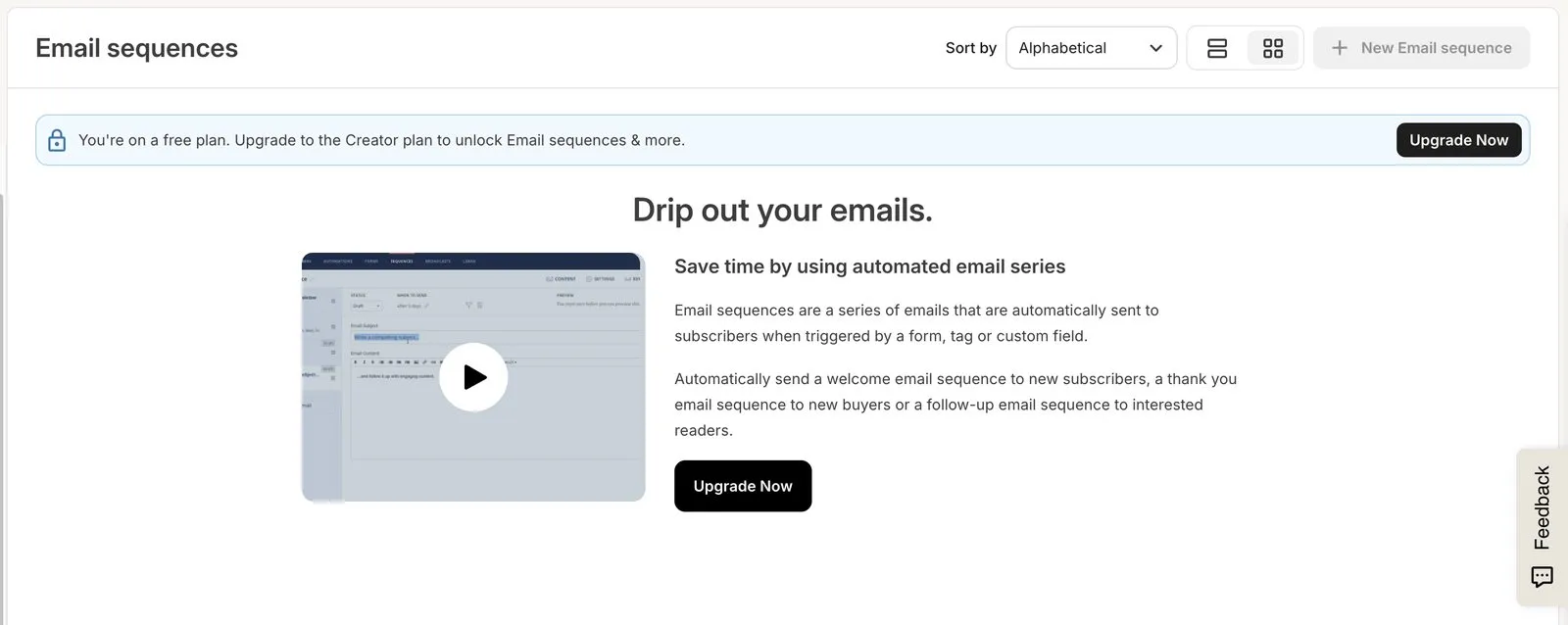
The free plans are almost mirror images, and both have a catch worth naming plainly. Kit’s is enormous but withholds automation entirely — open Email sequences on the free plan and you get an upgrade notice, which is what happened to us. MailerLite’s includes automation but stops at 250 subscribers, and sending locks once you pass that.
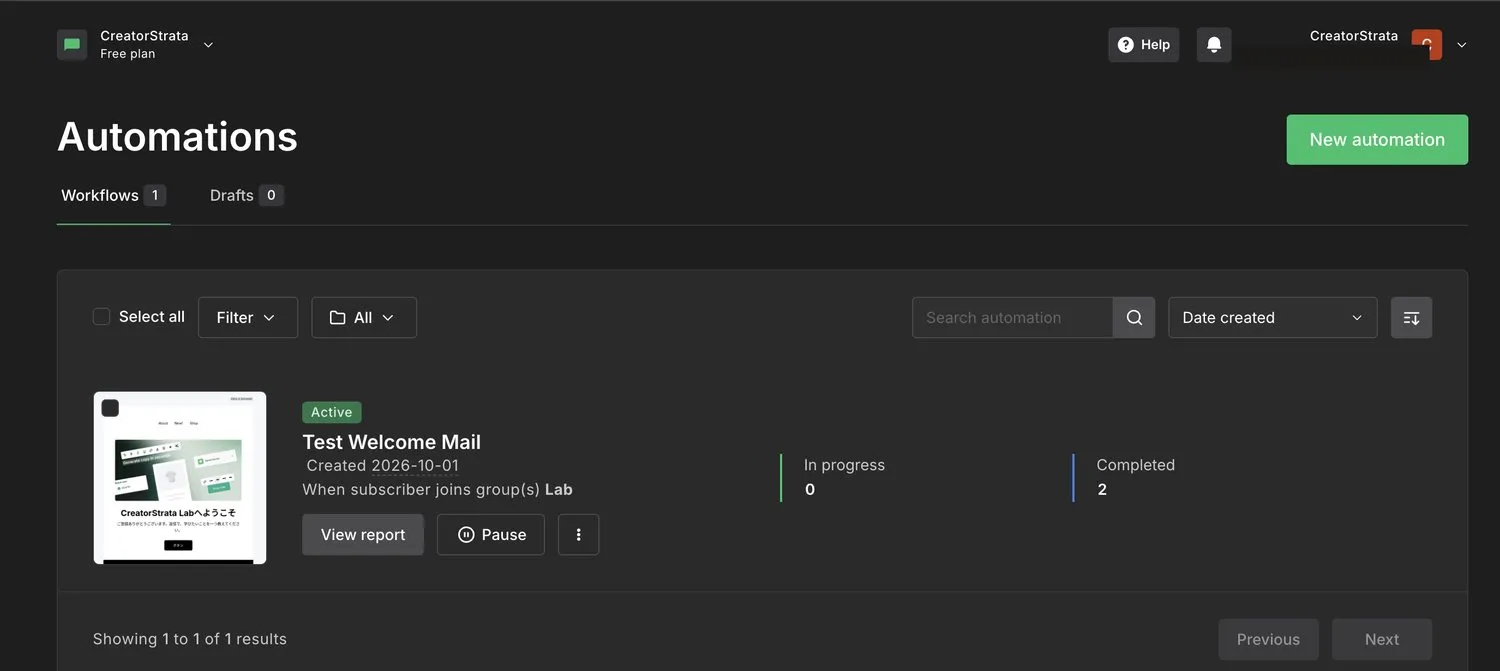
MailerLite’s free plan answers the same request differently: the welcome automation we built there is still running, on an account paying nothing.
At the paid tier the gap is stark: roughly $12 against roughly $33 at comparable small list sizes. Both scale with subscriber count, so re-check at your target size before deciding.
Automation
Kit is meaningfully stronger, and this is the reason to pay the difference.
Kit’s model is tags and events, not lists. A subscriber can be on the waitlist, a past customer and a webinar no-show simultaneously, and automations branch on those states. The visual builder keeps complex logic readable, which matters more than it sounds when a launch sequence grows to twenty steps.
MailerLite’s automations are genuinely capable — Comfort allows 50 active workflows, Power unlimited, with multiple triggers — and they cover the great majority of what a solo creator builds: welcome sequences, lead magnet delivery, tagging on click, simple re-engagement. What they are not built for is intricate multi-branch commercial logic across several products.
The honest test: sketch the most complicated automation you actually intend to build this year. If it fits on a napkin, MailerLite runs it. If it needs a second napkin, you want Kit.
Ease of use
MailerLite is the easier product to get moving in. The drag-and-drop editor is conventional, templates are ready, and nothing requires you to understand a data model first.
Kit asks for that up-front thinking about tags and segments. It rewards it, but the first session is slower, and the reward only arrives if you use the automation you set up — which on the free plan you cannot.
For what it is worth as one data point: setting Kit up and sending a first real email took 13 minutes of handling, MailerLite 22. We would not read that as a verdict on MailerLite. MailerLite was the first of the three platforms we touched, so it absorbed the learning curve for all of them, and part of those 22 minutes went on our own out-of-date checklist rather than on anything the product did.
One practical wrinkle: MailerLite reviews new accounts before you can send. When we signed up in September 2026 the review asked for a website or a social account and approved us immediately, so the same-afternoon launch was never in danger — but it is a step that exists, and an account with nothing to point at may not clear it as fast.
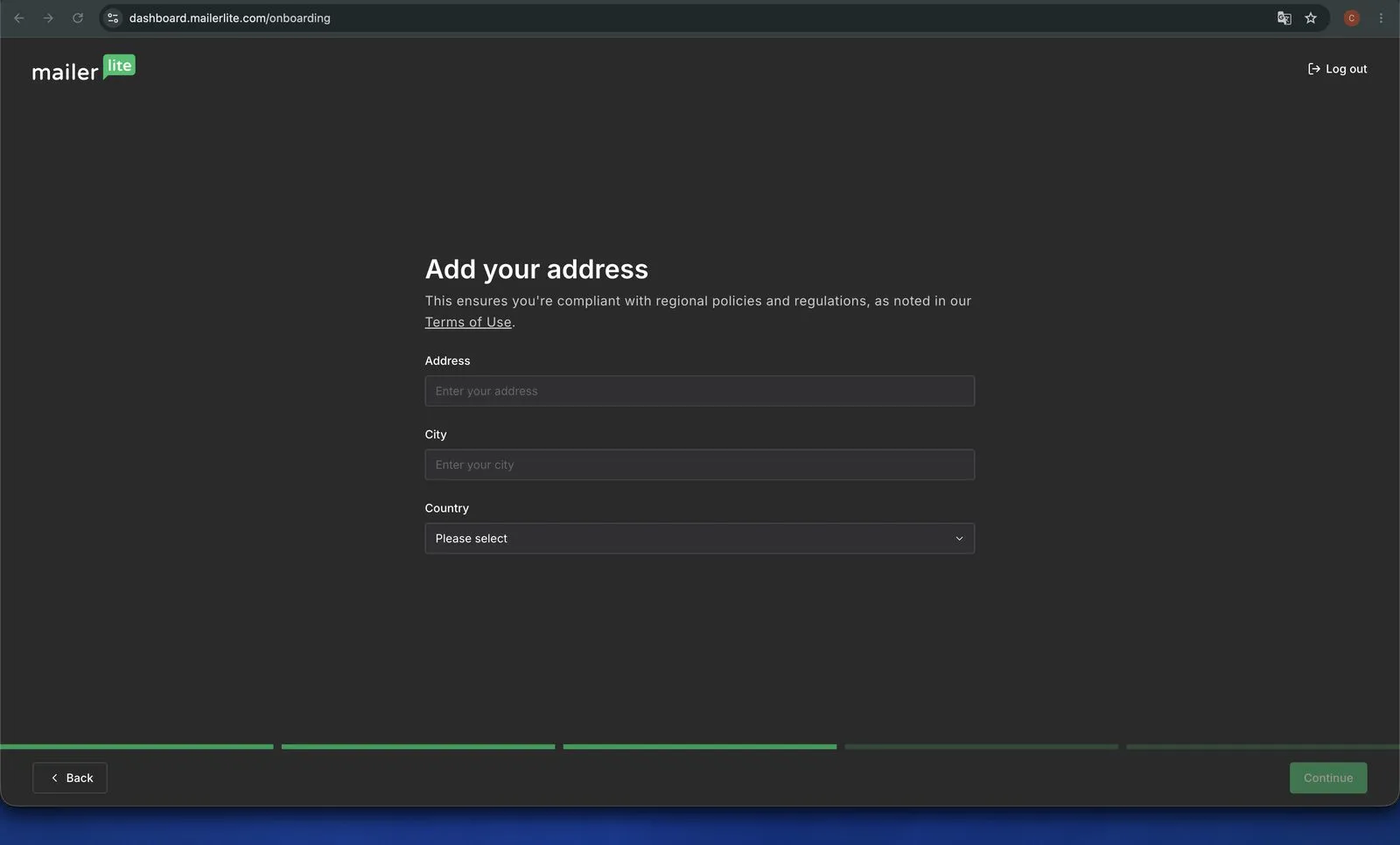
Two things about MailerLite’s signup are worth knowing before you start it. It asks for a postal address, and that address then appears in the footer of every email you send, which matters if you work from home. And new accounts begin on a 14-day trial of the premium features rather than on the free plan, so what you are trying for the first fortnight is not what you keep.
Design and content
MailerLite gives you more visual control out of the box: unlimited templates, a comfortable editor, plus websites and landing pages included even on the entry paid plan.
Kit’s emails are intentionally plain — text-forward, personal-looking. Some creators choose it for exactly that; others find it limiting. Kit’s landing pages and forms are strong; its email design is not where it competes.
Selling
Both let you sell digital products directly, and both support paid subscriptions.
Kit’s advantage is what happens around the sale: purchase events feed the tag model, so the follow-up sequence, the upsell and the exclusion from the next launch campaign all fall out of the automation you already built. MailerLite sells the product competently but does less to orchestrate what comes next.
If selling is occasional, that difference is theoretical. If you launch regularly, it is the whole game.
Pros and cons
Kit — pros: the strongest visual automation of the three tools we cover; tag model built for multi-offer creators; 10,000-subscriber free tier for holding a list; native digital products; free migration. Kit — cons: automations and sequences require the paid plan, with nothing of either on the free one; roughly 3x MailerLite’s entry price; plain email design; deeper analytics on Pro only.
MailerLite — pros: the cheapest entry paid plan of the three tools we cover; automations, websites and landing pages included from the free plan up; easy editor; three editors including plain HTML; unlimited sends on Power. MailerLite — cons: free plan capped at 250 subscribers and 2,500 emails; automation depth below Kit’s; no newsletter growth network; account review before the first send; 24/7 live chat is Power-only, so Comfort gets email support.
Who should choose Kit?
- You run launches, funnels or several products and need branching logic
- You think about subscribers as states rather than lists
- Automation is the reason you are switching in the first place
- You want purchase behaviour to drive what happens next automatically
- The price difference is small relative to what the list earns
Who should choose MailerLite?
- Monthly cost is the deciding factor
- Your automations are welcome sequences and lead magnet delivery
- You want landing pages and a simple site bundled in
- You would rather spend the difference on something other than software
- You are early enough that flexibility matters more than depth
Alternatives
If your newsletter is itself the product rather than a channel, neither of these is the natural fit — beehiiv builds growth and monetization into the platform and has a free plan to 2,500 subscribers. See the full round-up for all three side by side.
FAQ
Can I move from MailerLite to Kit later? Yes — subscribers export cleanly and Kit advertises free migration help. Automations, landing pages and forms do not transfer; you rebuild those. That cost grows the longer you wait, so if you are confident you will need Kit’s depth within a year, starting there is often cheaper overall.
Is MailerLite’s free plan enough to start? For testing the product, yes. As a runway, no — 250 subscribers and 2,500 monthly emails go quickly, and sending locks when you pass the subscriber limit. Kit’s free plan or beehiiv’s free plan give you far more room before the first invoice.
Which has better deliverability? Neither publishes data that would support a confident answer, and your own sending practices matter more than the platform. Be sceptical of comparisons that rank them on this.
Does Kit’s price include everything? Creator covers automations, sequences and integrations. Engagement scoring, deliverability reporting and the referral system sit on Pro at $66/month. Check which tier your must-have feature is actually on before comparing prices.